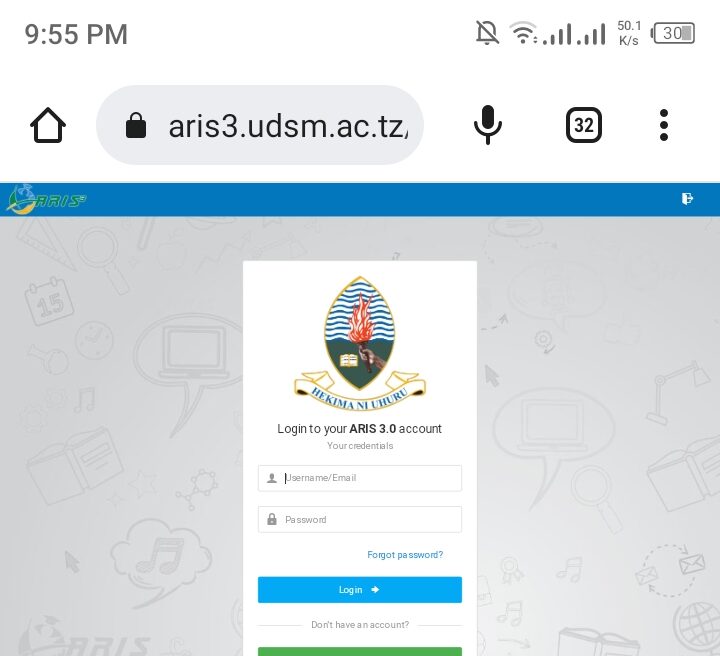
ARIS 3 UDSM is a digit System Designed and Developed by The University of Dar es Salaam (UDSM) Computing Center to Manage Various academic and Non academic Duties such as Accommodation services to Hostel dwellers. In Aris 3 Udsm Students may perform various Task such as Semester Registrations, Course Registration Particularly Room Shopping For Student who willingness to stay in Campus Areas (HOSTEL). Also, Students May Check Academic Information such as Course Work Assessments (CA) Particularly Final Examination Results (UE) through ARIS 3 UDSM.
The Development of Technology in the world revolutionized educational system as Now Moving From Analogy system to current day Digital system where there is no need to have hardcopy of some information a the university of Dar es Salaam (UDSM) as Students can access his or Her results digitally via digital devices such as Smartphones and Computers as well as Laptop Via UDSM Aris 3.
Important Information Required To Login ARIS 3 UDSM
To login Aris 3 UDSM you need to have some Important Information listed to be identified as students admitted at the University of Dar es Salaam (UDSM) as well as Registered Candidates. Before Login Make Sure you have the Listed Requirements.
- Your student ID number
- Password (Usually provided by the university or set during your first login)
- A stable internet connection
- A compatible web browser (Google Chrome, Mozilla Firefox, etc.)
NB: You can Visit Aris 3 UDSM Portal for Course Registration Particularly Generating Control Number for Direct Cost and Tuition Fees Via Direct Link attached Here.(https://aris3.udsm.ac.tz/)
How to Login UDSM Aris 3 ?
In this article Section get ready to know how can you access UDSM Aris 3. In order to access UDSM Aris 3 you need to be registered on system as UDSM Students or UDSM Staffs. For Students you need to have Registration Number but For UDSM Staff required to have employee Number which recognized by System but also provided during registration. Follow the Steps Listed below to access and Login UDSM Aris 3.
- Visit Your Web Browser: Choice the best Browser which are responsible to your device which may be Smartphones, Computer or Laptop.
- Navigate to ARIS 3 UDSM Official Website: Type in the URL for the ARIS 3 UDSM website https://aris3.udsm.ac.tz/
- For Students Select “Student Login” For Staff Select “Staff Login”: Once the ARIS 3 UDSM homepage opens, look for the ‘Student Login’ button and click on it.
- Enter Credentials: You will be prompted to enter your student ID and password. Make sure you enter them correctly.
- Log In: Click the ‘Login’ button.
- Dashboard: Upon successful login, you will be taken to your dashboard, where you can navigate through various options like ‘Academic Records,’ ‘Course Registration,’ ‘Exam Results,’ and many more.
NB: Keep your Password privacy and secured to avoid inconvenience which may resulted to some academic cases but also, keep changing Password each 90 Days As after those days the systems required you to updates your password for security reason.
Leave a Comment