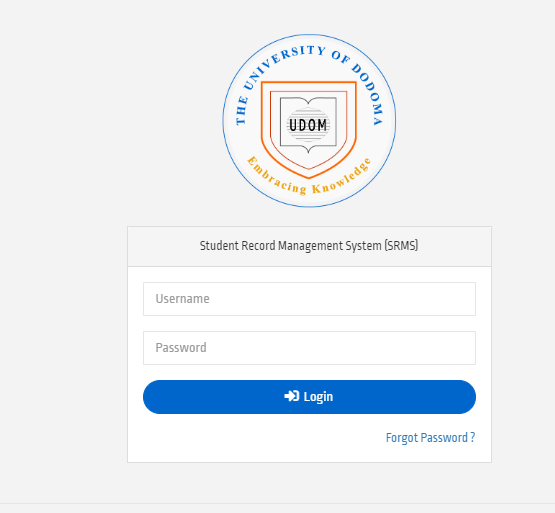
UDOM SR2 – Student Record Management System which referred as SRMS Termed as a digital online system designed and developed by the University of Dodoma (UDOM) to facilitate management of all academic records to all programme as well as well students admitted at the university of Dodoma without Regarding the Year of Study. The portal provide a limited authority to both students and staff member as students may have an access some tasks within the system such as registering semester and courses but also, can generate bills for Tuition Fees as well as for accommodation.
In this article, we will looking for does UDOM SR2 Works particularly basic features of the system and how freshers and continuous students at the University of Dodoma (UDOM) may have an access to it.
Basic Features of UDOM SR2 -Students Record Management System (SRMS)
Basically The University of Dodoma (UDOM) SR2 posses a basic features to which every students registered at the university may have an access to it without regarding their position at the university. Survey the basic features below.
1. The University Of Dodoma (UDOM) SR2 Login Access; Every Students admitted at the University of Dodoma (UDOM) may access a login access to the portal once he or she has completed all registration process. The students will have an login username on Admission later which will be useful as an identification number at the university of Dodoma Campus.
2. Academic Records Feature: All all students at the University of Dodoma (UDOM) may access all records related to academic activities via the system as the system keeps records of results for all year of studies particularly Coursework Assessment (CA).
3. Course Registration; After being admitted at the University of Dodoma all students required to have registered to UDOM SR2 so as to preform some tasks which may not performed manually. Therefore, Students will be responsible to register all course belonging to a particular semester o be identified as students studying the course.
4. Personal Information; also, students may manage all information related to him or her such Contacts information. Students can change Phone Number as well as Email if necessary.
How to Access UDOM SR2 – Students Records Management System?
Comprehensive guides on how to access the portal which leave you with an insight on how you can access the system. Travel with guides journey to get detailed information about the way you can access the portal easily for accessing academic records, generating bills for Tuition fees and accommodation to Hostel dweller.
Step 1: Visit any browser of Your Choice in your device which can be Smartphones or Laptop. NB: Make sure you have stable internet connection.
Step 2: Search “UDOM SR2” or Use the Direct Link “https://sr2.udom.ac.tz/”
Step 3: Fill your Personal Information required on homepage. Commonly, Username and Password.
Step 4: Tap/ click Login to access sr2 Dashboard.
NB: Keep your Username and password privacy to protect your information as well as implementing Security Policy.
Some Students may have confused about UDOM SR2 and SRMS but is the same as both referred to the portal useful at the University of Dodoma to keep students records as well as to link Educators and students as Lecturer at the University communicated academically to the students via the portal this means that, the upload results and the students they check it via the system without consulting educators physically.
In case have Forgotten the Password, you can reset the Password by click Button Named “I Forgotten Password” at Homepage Login. and following all procedures listed by the system. Email used during registration are commonly needed.
RELATED: UDOM SR2 (SRMS) Login
Leave a Comment